
YNAB
ynab.comFinance
4.64.72K Reviews
- Version
- 26.32.0
- Installs
- 1.00M
- Age Rating
- Everyone
Screenshots

Our Review of YNAB
 Analysis by Appyee
Budgeting works best for me when it helps me decide what money should do before I spend it, rather than simply showing where it went afterward. That is the idea I find most useful in YNAB: it asks me to make choices in advance and adjust them as real life gets in the way. The approach can feel demanding at first, but it gives the budget a purpose beyond keeping a record.
Who benefits most from planning ahead
I’d recommend this style to someone whose income arrives regularly but seems to disappear into a blur of bills, errands, and small purchases. It can also suit people with uneven income, provided they are comfortable building plans around money already available instead of relying on money they expect to receive. That distinction changes the question from “How much might I earn this month?” to “What needs this money now?”
It is less appealing if you only want a passive overview of accounts or an automatic list of transactions. A conventional expense tracker may be a better fit when the main goal is categorizing purchases after the fact. Here, the useful work is deciding and revisiting priorities; if you do not want to maintain those decisions, the method may feel like an extra chore rather than a relief.
A budget that responds to an ordinary week
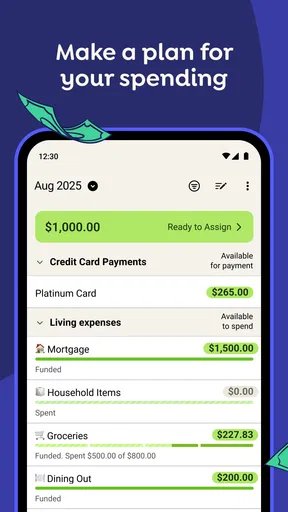
Imagine I have set aside money for groceries, transport, and a utility bill, then a child’s school expense arrives earlier than expected. The practical move is not to pretend the original plan still works: I can shift money from a less urgent category and see what that choice means for the rest of the month. That small pause is valuable. It turns an unplanned cost into a deliberate trade-off instead of leaving me to wonder later where the money went.
A useful habit is to check the relevant category before buying, not just review the transaction afterward. If I am about to make a nonessential purchase, that glance tells me whether the money is genuinely available or already committed to something more important. This is where the method can prevent overspending: not through a warning after the damage, but through a decision made while there is still time to choose differently.
What the workflow asks of you
Give-every-dollar-a-job budgeting works best when I treat categories as plans, not rules carved in stone. If groceries run over, I can move money from another category and keep the budget honest. The key is to make that adjustment visible. Repeatedly shifting money without asking why can hide a pattern; reviewing the changes can reveal whether the original estimate was unrealistic or whether a habit needs attention.
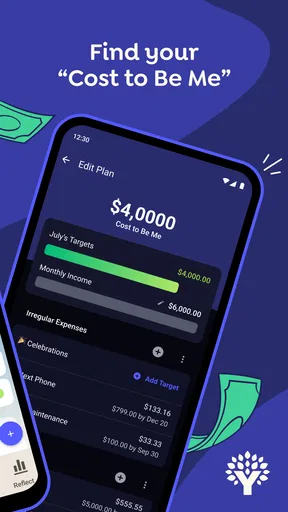
For irregular costs, I would start with a few expenses I know tend to arrive eventually, such as annual renewals, seasonal needs, or replacing a worn-out household item. Breaking a future bill into smaller contributions makes it easier to prepare without treating the due date as a surprise. The trade-off is that these categories compete with immediate wants, so I have to decide which future costs deserve priority rather than trying to save for everything at once.
How it differs from a standard tracker
Many finance apps emphasize account balances, spending charts, or automatic categorization. Those views can be helpful, especially when I want a quick snapshot, but they do not necessarily tell me whether the money is already needed elsewhere. This app’s more hands-on approach shifts attention from the account total to the amount available for each purpose. I find that more useful for making day-to-day choices, while a lighter tracker may be more convenient for someone who mainly wants to observe spending.
There is also a practical middle ground: use the budget for decisions and treat reports as a review tool, rather than expecting charts to do the planning. For example, if a category repeatedly runs short, I can check whether the estimate needs changing or whether my spending has drifted. A report is most helpful when it leads to a specific adjustment; looking at numbers without acting on them does not improve the plan.
A Fresh Take on Budgeting
First things first, YNAB isn’t your typical budgeting tool. It’s more of a philosophy wrapped in a sleek app package. When I first installed it, I was greeted with a clean, user-friendly interface. It was clear right off the bat that this app was designed to help you not just track your spending, but actually take control of it.
Setting Up
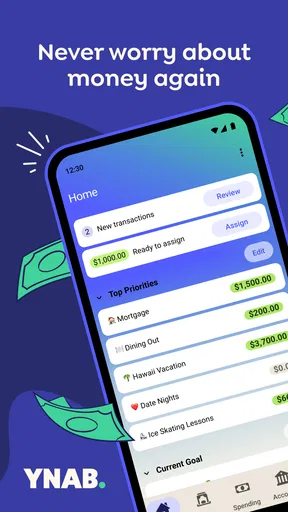
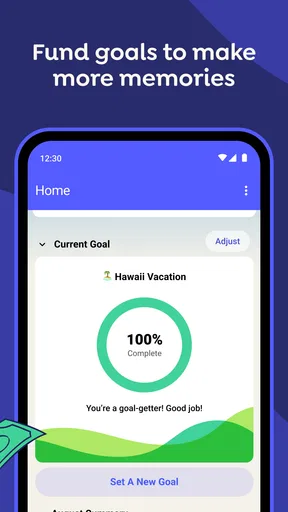
Getting started with YNAB was pretty straightforward. The app walks you through connecting your bank accounts, which was a breeze. All transactions automatically sync, saving you the hassle of manual entry. I loved how the app encouraged me to assign every dollar to a "job," whether it’s for groceries, rent, or saving for that dream vacation. It’s like giving your money a purpose!
The Four Rules
The heart of this budgeting method lies in its four simple rules:
- Give Every Dollar a Job: This means budgeting every dollar you earn. It really makes you think about what’s important.
- Embrace Your True Expenses: Instead of being blindsided by big expenses, this rule helps you save a little each month for those inevitable costs.
- Roll With the Punches: Life happens, and YNAB encourages flexibility. It’s okay to move money between categories when things don’t go as planned.
- Age Your Money: The idea is to spend money you earned at least 30 days ago, which can really help break that paycheck-to-paycheck cycle.
These rules have been a revelation for me. I found myself getting more intentional with my spending and actually saving more than I thought possible.
Tracking Progress
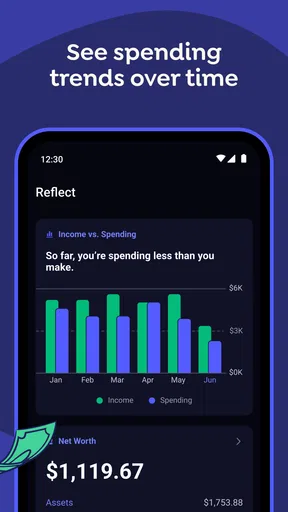
Another feature that stood out to me is the reporting. YNAB provides detailed reports that show where your money is going and how your spending habits change over time. It’s both fascinating and a bit eye-opening. I realized I was spending way more on coffee than I thought! These insights have helped me adjust my budget and make better financial decisions.
To get more from those reports, I would look for trends rather than judging a single week. One unusually expensive grocery trip may not call for a lasting change, while a category that keeps running short deserves a closer look. Comparing the plan with actual spending can help me set a more realistic target, and it can also show when a one-off expense should be handled differently from a recurring habit.
Community and Support
I also discovered that YNAB isn’t just an app; it’s a community. There are tons of resources, from live workshops to a supportive online forum. Whenever I had questions or needed motivation, I found plenty of help. It’s like having a personal finance coach in my pocket!
That learning support is especially helpful when the budgeting approach feels unfamiliar. I would use it to understand the method and build a repeatable routine, rather than expecting a workshop or forum to make the decisions for me. The important personal work remains choosing priorities and being willing to revise them when circumstances change.
Security and Privacy
In today’s digital age, security is a big deal for me. I was relieved to see that YNAB takes privacy seriously. The app uses bank-level encryption to protect your data, which gave me peace of mind while managing my finances.
Even with that reassurance, connecting financial accounts is a personal choice. Someone who prefers not to link accounts can consider whether entering transactions manually fits their routine, while anyone who does connect accounts should take the usual care with device access and account credentials. Convenience matters, but it should not replace being comfortable with how I manage sensitive information.
The Mobile Experience
On the go? No problem. The mobile app is just as intuitive as the desktop version. Whether I’m tracking my spending on a weekend getaway or adjusting my budget during a shopping trip, the app keeps everything at my fingertips. It’s incredibly convenient!
The most useful mobile moment for me is before a purchase or soon after an unexpected one: I can check the plan while the decision is still fresh. For larger planning sessions, I would still set aside quiet time to review several categories together. Quick checks keep the budget current, while a calmer review helps me notice the bigger choices behind individual transactions.
Current version and ongoing use
The finance app is developed by ynab.com, and its current version is 26.4.2. It first appeared on October 20, 2015, so it has been available for years, but a version number by itself does not tell me which changes were introduced or how a particular update affects my routine. I would treat the version as a practical compatibility detail, not as proof of a specific new feature.
For someone already using it, the sensible approach is to keep the app current and check that the features and account connections they rely on still work as expected after an update. I would not rebuild a budget merely because the version changed. The categories, targets, and habits that make the system useful are personal choices; changes to the app matter most when they alter a workflow I actually depend on.
As a product, it has a substantial audience: it has more than a million installs, around 24,000 ratings, and an average rating of 4.5. Those figures suggest that many people have tried it, but they cannot tell me whether its hands-on method suits my finances. I would weigh the approach and the time it asks of me more heavily than popularity.
Cost, access, and expectations
The app is free to download, with in-app purchases ranging from $14.99 to $109.00 per item. I would check the purchase details shown in the app before committing, then decide whether the ongoing budgeting routine is useful enough for my circumstances. Someone comparing it with a free, basic expense log should remember that the real difference is not just price: this system expects active planning, while a tracker can require less attention.
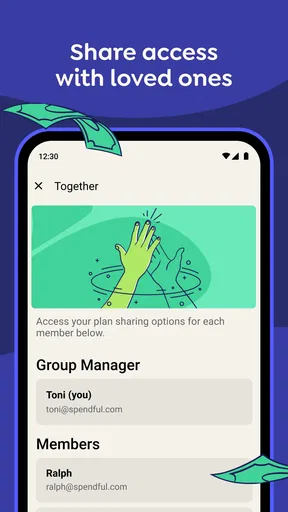
It is rated for Everyone and requires iOS 11 or later. That makes the age label broad, but the budgeting decisions are still aimed at whoever manages the household’s money. If several people share expenses, they should agree on category priorities and who will keep the budget current; otherwise, the app can make disagreements visible without resolving them automatically.
Who should choose another approach
I would skip this method if I only want to see my account balances in one place, dislike assigning money to categories, or know I will not check the plan before spending. A simple spreadsheet or a lightweight tracker may be a better match for those needs, particularly if I am comfortable reviewing purchases periodically and do not need a forward-looking plan.
It may also take patience for someone whose income varies sharply or whose essential bills already exceed what comes in. A budget can clarify priorities, but it cannot create money to cover a shortfall. In that situation, the value is in seeing the gap and making choices with open eyes; the app should not be mistaken for debt advice or a substitute for practical help with urgent financial problems.
So, after spending some quality time with this budgeting approach, I can confidently say it’s a fantastic tool for anyone looking to take control of their finances. It’s more than just tracking expenses; it’s about building better habits and finding financial peace of mind. If you’re ready to transform your relationship with money, give it a try. Trust me, you won’t regret it!
My recommendation
My recommendation is strongest for people who want a deliberate plan, are willing to check it regularly, and value being able to move money between priorities when life changes. I would begin with a small set of meaningful categories, include a few predictable future costs, and review the plan after real spending has tested it. That keeps the first steps manageable instead of turning setup into an attempt to predict every possible expense.
If I wanted only automatic tracking, I would choose a simpler option. If I wanted to change how I make spending decisions, this app’s approach would be worth trying. Its lasting value depends less on a dashboard or a version number than on whether I return to the budget, make honest adjustments, and let those decisions guide the next ordinary purchase.
Verdict
Strengths of YNAB
- Intuitive budgeting interface.
- Real-time financial updates.
- Syncs across multiple devices.
- Customizable expense categories.
- Strong customer support.
Limitations of YNAB
- Requires subscription after trial.
- Steep learning curve for beginners.
- Limited investment tracking.
- No direct bill pay feature.
- Mobile app lacks some desktop features.
Similar Picks in This Category
View All
Google Wallet
Google LLC4.3

Airtel: Recharge, Bank & Loans
Airtel4.0

PayPal - Pay, Send, Save
PayPal Mobile4.2

DANA Indonesia Digital Wallet
PT Espay Debit Indonesia Koe4.5

Binance: Buy Bitcoin & Crypto
Binance Inc.4.8

Cash App
Block, Inc.4.7
Frequently Asked Questions
What is YNAB and how does it work?
YNAB, which stands for 'You Need A Budget,' is a personal budgeting app designed to help users manage their finances effectively. It operates on a zero-based budgeting system, where every dollar is assigned a job. Users input their income, allocate funds to various categories, and track expenses to maintain control over their finances.
Is YNAB available on both Android and iOS devices?
Yes, YNAB is available on both Android and iOS platforms. The app provides a seamless experience across devices, ensuring users can access their budget on the go. It also offers a web version, allowing for flexibility and convenience in managing finances from any device with an internet connection.
What are the primary features of YNAB?
YNAB offers several key features, including customizable categories, goal tracking, real-time sync across devices, and detailed reporting tools. Users can set savings goals, monitor spending habits, and receive insightful feedback on their financial progress. The app’s user-friendly interface makes budgeting accessible for everyone.
Are there any costs associated with using YNAB?
YNAB offers a free 34-day trial for new users to explore its features. After the trial period, a subscription is required, which is priced annually or monthly. Though it is a paid service, many users find the cost justified by the app's ability to improve financial management and control.
How secure is my financial data with YNAB?
YNAB prioritizes user security with robust encryption measures and regular security audits. The app uses bank-grade security protocols to protect financial data. Additionally, YNAB does not store banking credentials, ensuring user information remains private and secure from unauthorized access.
